
Lean Waste: Make Waiting and Defects Visible on CNC Machines
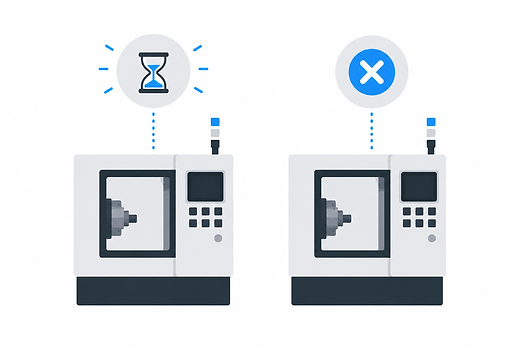
Lean Waste: Make Waiting and Defects Visible on CNC Machines
In many CNC job shops, “lean waste” isn’t hiding in a textbook category—it’s hiding in plain sight as short, repeatable interruptions that never look big enough to log. The machine didn’t crash. Nobody called maintenance. The schedule still says the job is “running.” Yet the day ends and capacity feels like it disappeared.
The operational problem is diagnostic: if you can’t see where the minutes go—by machine, by shift, and by reason—you end up debating opinions instead of correcting flow. Two lean wastes drive a lot of that invisible leakage in job shops: waiting and defect-related stops.
TL;DR — Lean waste
Treat lean waste as lost machine minutes, not abstract categories.
Waiting often shows up as many short “not cutting” pauses that get normalized.
Defect-related waste is frequently an inspect–rework–restart loop, even when scrap looks low.
ERP/end-of-shift notes record completions, not interruptions—micro-stops vanish.
Capture stops over a practical threshold and require consistent reason codes by shift.
Review patterns by machine/job/shift to move from blame to process fixes.
Recover hidden time before assuming you need more machines or overtime.
Key takeaway Lean waste becomes fixable in a job shop when it’s captured as time-stamped downtime behavior—especially recurring waiting and defect-related micro-stops that ERP and shift notes compress away. Once you can compare those patterns by shift, machine, and job, you can correct constraints the same shift and recover capacity before spending on new equipment.
Lean waste in a job shop: where it actually shows up (on the machine clock)
Lean waste becomes operationally useful when you can point to lost minutes on specific machines that delay flow to the next step. In a high-mix CNC environment, that’s the only definition that consistently drives action: what caused the machine to stop, for how long, and how often did it repeat?
Job shops often misread waste because variety hides patterns. When every day includes different part numbers, materials, and routings, it’s easy to assume interruptions are “just the nature of the work.” But the same families of problems show up again and again—just in short bursts that don’t feel worth writing down.
Two wastes tend to hide in plain sight as downtime: waiting (the machine is ready, but something upstream or adjacent isn’t) and defects (the process produces uncertainty that forces checks, rework, and restarts). They often show up as micro-stops: short interruptions—sometimes only a few minutes—that happen repeatedly. A single long breakdown gets attention; dozens of small pauses often become the shop’s “normal.”
Waste 1: Waiting—how 'not cutting' time gets normalized
Waiting in CNC shops rarely looks dramatic. It’s the subtle “not cutting” time that creeps in between cycles, between pallets, or between steps that depend on another person’s availability. Common waiting modes that get treated as normal include material staging delays, tool preset/tool crib backlogs, program approval, first-article signoff, QC queue time, and even forklift interruptions.
Waiting also tends to be undercounted because responsibility is shared. The operator may be ready, but the hold-up is inspection, programming, kitting, or material handling. And because the pause often ends quickly, it doesn’t make it into end-of-shift notes—especially on a busy multi-shift floor.
Scenario: “Running” on nights, but waiting on inspection in reality
Consider a multi-shift CNC cell where the night shift logs the job as “running,” but day shift finds parts stacked up waiting for first-article signoff. What’s happening operationally is usually a string of short pauses: the machine runs a piece or two, then stops while the operator tries to get inspection attention, then restarts, then stops again. Without structured downtime capture, that pattern gets collapsed into “ran fine” because nothing looked like a major stoppage.
With time-stamped tracking, those repeated events show up explicitly as “waiting on inspection” stops—often in the 2–7 minute range, repeated many times—plus the shift context (which shift saw it, and when). That changes the decision from “night shift didn’t run” to “inspection coverage and first-article workflow are creating stop-and-go production that ERP never recorded.”
Scenario: queue-based waiting at shift change and lunch coverage
Another common waiting pattern is queue-based: machines stop because material isn’t kitted or pallets aren’t staged. On paper, everyone is “busy,” but the machine spends short blocks of time idle while someone finds stock, pulls the next pallet, or waits for a forklift. These micro-stops often spike at shift change and around lunch coverage gaps because ownership of staging tasks becomes ambiguous during handoffs.
To make waiting measurable, capture: the start/stop time, a consistent reason code (e.g., waiting on material, waiting on pallets, waiting on forklift), and the job/shift context. Even lightweight discipline here prevents “we think it’s material” debates and enables practical countermeasures.
For more on structuring this kind of visibility, see machine downtime tracking—the goal isn’t more reporting; it’s capturing the interruptions that quietly remove capacity.
Waste 2: Defect-related stops—quality issues as downtime, not just scrap
Defects are often discussed as scrap rate, but in job shops the bigger operational hit can be the time-loss loop: measure, adjust, rework, rerun, verify, and only then proceed. Even when scrap is low, defect-related uncertainty can cause frequent stops that reduce throughput and destabilize queues downstream.
Common CNC triggers include tool wear that isn’t standardized across shifts, fixture variation, offsets that drift or aren’t approved consistently, gaging availability constraints, and first-article churn when the process isn’t contained tightly enough at startup. The key point: if the machine stops to diagnose or correct quality, that’s downtime behavior—regardless of whether a part gets scrapped.
Scenario: intermittent out-of-tolerance bores on a lathe
In a high-mix job shop, imagine a lathe that stops intermittently due to out-of-tolerance bores. Operators pause to measure, rework, and restart—sometimes multiple times on the same job. If the stop is logged at all, it’s often generalized as “quality” or misattributed to “operator performance,” because the evidence is scattered across the shift.
When defect-related stops are time-stamped and categorized (e.g., out-of-tolerance bore, finish issue, missing feature, wrong tool loaded), you can see clustering. In this scenario, the data often points toward a specific program/tool/fixture combination rather than a person: the same job repeats the same quality interruption, with similar stop durations and timing. The operational decision enabled is targeted: verify the fixture, standardize tool life/insert change rules, or tighten the offset approval workflow for that program before it runs again.
The stop reason matters because “quality” is too broad to assign ownership. Specific categories let you route action: programming offsets, tooling standards, gage availability, fixture verification, or first-article containment. That’s how defect-related waste stops being a vague frustration and becomes a measurable, repeatable pattern you can correct.
Why these wastes stay invisible: end-of-shift reporting can’t see micro-stops
End-of-shift summaries compress reality. When a shift is busy, the notes gravitate toward a few broad labels: “ran fine,” “minor issues,” “waiting on material,” “quality problems.” Micro-stops disappear because they feel too small, too frequent, or too hard to reconstruct after the fact.
ERP/MES job tracking has a different limitation: it’s built to track jobs and quantities, not interruptions. Completions and move tickets tell you what got done; they don’t show how many times the machine paused to wait on inspection, hunt for a pallet, or measure a feature.
This creates the “running vs producing” problem. A machine can be powered on and logged as active while still losing meaningful time to stops, checks, and waiting. To close that gap, visibility needs to look like a sequence of time-stamped downtime events with consistent reason capture—so the conversation is based on observed behavior, not memory.
If you want a broader overview of how these systems are typically thought about (without turning this into a dashboard discussion), see machine monitoring systems.
Downtime tracking as a lean tool: making waiting and defects measurable
Downtime tracking functions as a lean tool when it follows a simple mechanism: capture stops over a practical threshold, apply consistent categories, and review patterns by shift/machine/job so the owners of the work can act. The point is disciplined capture, not perfect capture.
A key design choice is the micro-stop threshold. If you only record long downtime, you’ll miss the bulk of waiting and defect-related waste, because those events often happen in short bursts. Operationally, choose a threshold your team can sustain—often something like “capture anything that stops production long enough to disrupt flow,” then adjust as consistency improves. The best threshold is the one operators can apply without slowing the shift down.
Reason-code governance matters more than having a huge list. Keep codes few (often 10–15 to start), specific, and aligned to action owners. “Waiting” is not specific enough; “waiting on inspection” or “waiting on material” is. Likewise, “quality issue” is not actionable; “out of tolerance,” “finish issue,” or “wrong tool loaded” points to a fix path.
The operational payoff is decision speed. When supervisors can see emerging queues—inspection backlog, missing kits, recurring defect checks—they can rebalance resources before the shift ends rather than discovering it the next morning. This is also where interpretation support can help teams stay focused on patterns instead of anecdotes; an AI Production Assistant can be useful for quickly summarizing recurring stop reasons by machine and shift and turning raw events into a review-ready narrative.
What to do once the waste is visible: practical countermeasures (not theory)
Once waiting and defect-related stops are visible as patterns, countermeasures become straightforward because they can be tied to ownership and timing. The goal isn’t a perfect lean program; it’s stopping repeatable time loss from becoming the shop’s default.
Waiting countermeasures
Create kitting readiness gates: jobs don’t release to the machine until material, prints, tools, and gages are staged.
Define inspection coverage expectations (an internal SLA): especially around first-article and multi-shift handoffs.
Tighten tool crib/preset workflow so tool readiness doesn’t become a hidden queue.
Stage pallets and standardize “ready-to-run” checks at shift change (ownership matters more than checklists).
Defect-stop countermeasures
Standardize tool life rules and replacement triggers so quality doesn’t depend on who is running the shift.
Ensure gage availability at the point of use; avoid “walk-and-wait” measurement loops.
Contain first-article: define who approves, how fast, and what happens if approval isn’t available.
Add fixture verification steps where your data shows clustering (specific fixture/program combinations).
Clarify offset approval workflow so adjustments are controlled and repeatable across shifts.
Assign owners by reason family (materials, QC, programming, tooling) to prevent the default failure mode: “operator blame.” Then validate progress with weekly Pareto-style reviews and shift comparisons. If you’re framing this as capacity recovery, connect the dots to utilization leakage and where your “lost” time is concentrated; machine utilization tracking software is the natural next layer for organizing that discussion across machines and shifts.
How to start in a 10–50 machine shop: a low-friction rollout plan
In a 10–50 machine job shop, the win isn’t a complicated rollout—it’s getting consistent capture across shifts without adding bureaucracy. Start in one area or cell and keep the scope tight: focus on two waste families first (waiting and defect-related stops). That prevents the project from turning into a generic reporting effort.
Define a practical stop threshold and a short list of reason codes (often 10–15 max) with clear definitions and examples. The definitions matter as much as the labels—especially for differences between shifts (e.g., what counts as “waiting on inspection” versus “first-article approval”).
Coach consistency early. A short training, a one-page examples sheet, and simple audit notes for the first two weeks are usually enough to prevent code drift. The objective is not perfection; it’s trustworthy patterns. If the data isn’t trusted, it won’t be used—and you’re back to gut feel.
Use a review cadence that matches shop reality: a quick daily check for anomalies (e.g., an inspection queue emerging mid-shift), a weekly pattern review to assign countermeasures, and a monthly pruning of codes so the system stays usable. This is also where cost framing should stay grounded: the expense is less about software line items and more about whether you can implement without heavy IT lift and whether the data becomes actionable. If you need the commercial context, use the pricing page to understand packaging and what deployment typically entails—without assuming buying new machines is the first answer.
If your shop is considering capital expenditure or additional shifts because capacity feels tight, this is the check to run first: make waiting and defect-related micro-stops visible, validate the top recurring reasons, and correct the process constraints that are silently removing machine time.
If you want to pressure-test whether your downtime data would answer the questions above (by shift, by machine, by reason, with micro-stops included), the fastest next step is a focused walkthrough of your environment and what you’d want to capture. You can schedule a demo to review your waiting/defect stop patterns, reason-code approach, and a realistic rollout path for a mixed fleet.
.png)



